Having spent exactly three years in the workforce, I recently encountered a golden opportunity that promised to propel my career forward by leaps and bounds: my company opened up a promotion slot for an overseas assignment, offering direct entry into the core management team for anyone who could demonstrate exceptional performance. However, the catch was that I would need to be seconded to Russia for a year—and, crucially, I had to master the latest practical AI skills within an extremely tight timeframe (a complete career pivot for me). Although English would remain the working language during the assignment, I realized I would need to quickly acquire basic spoken and conversational Russian to navigate daily life; simultaneously, I urgently needed to elevate my English speaking and listening proficiency to an even higher, more advanced level.
Faced with a mountain of specialized online AI courses—all in English—and the utterly unfamiliar characters of the Russian alphabet, I found that trying to slog through raw, untranslated video content on my own was so inefficient it was enough to bring me to tears. Initially, I experimented with various web-based translation tools available on the market, but they frequently failed to function when applied to video streams or live broadcasts. It wasn't until I stumbled upon TranslateSub—a real-time video translation extension in the Chrome Web Store—that my journey of self-study and cross-disciplinary upskilling finally kicked into high gear.
1. Say Goodbye to Inefficient "Blind Listening": The "Flow Experience" of Professional Online Courses and Global Live News Broadcasts
To rapidly pivot into the field of AI and hone my foreign language skills, I focused my efforts primarily on Coursera, Udemy, and YouTube. Every day after get off work, I would immerse myself in cutting-edge AI architecture tutorials on Udemy and tackle professional certification courses on Coursera; simultaneously—to train my ear and cultivate an advanced English linguistic environment—I would unfailingly spend several hours each day listening to live BBC News broadcasts on YouTube.
In the past, while working through this high-level content, my greatest frustration was that instructors often spoke too quickly, or that newly released technical courses completely lacked pre-generated subtitles. TranslateSub has perfectly resolved these pain points; not only does it support bidirectional translation across more than 75 languages, but it also delivers an unparalleled experience in terms of real-time synchronization for both on-demand videos and live streams:
Real-time Live Streaming with Zero Latency: When watching live BBC World News broadcasts on YouTube—which are real-time streams—there are no pre-generated subtitle files available. TranslateSub addresses this by precisely capturing audio directly at the system level, instantly generating flawless bilingual subtitles with millisecond-level precision. No matter how fast the speaker talks, the subtitles remain completely smooth and lag-free.
No Interference with Online Course Platform Layouts: Many traditional web translation extensions, once activated, can disrupt the interface of platforms like Coursera or Udemy, causing layout misalignments or browser crashes. In contrast, TranslateSub integrates into the browser as an extremely lightweight extension; it never interferes with the platform's native video player, rendering bilingual subtitles in a clean, aesthetically pleasing manner.
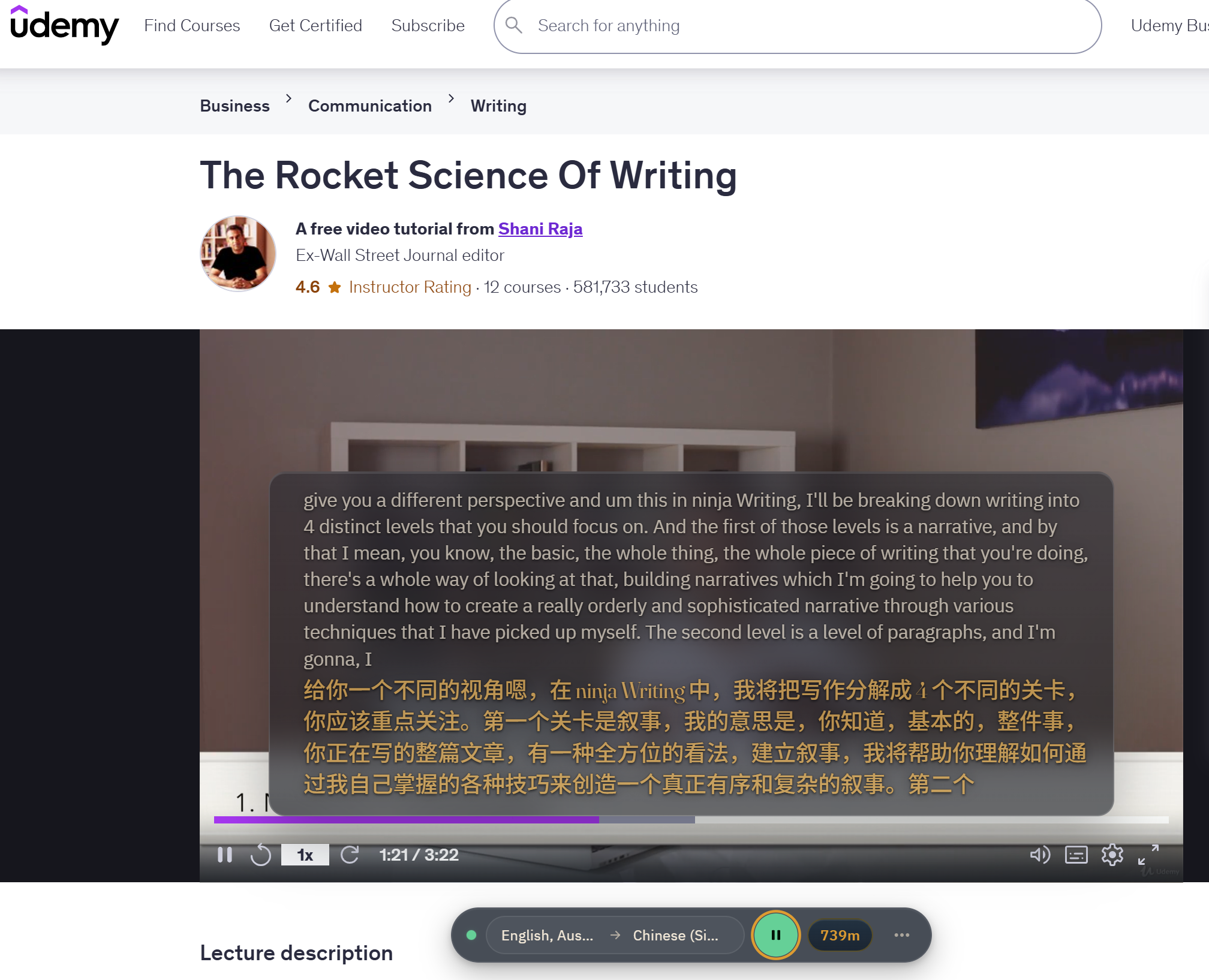
It is far more than just machine translation: it transcends the rigid limitations of traditional automated systems, capable of precisely recognizing complex specialized terminology and cross-industry jargon. Whether dealing with hardcore AI terminology or advanced political vocabulary from a live BBC broadcast, it consistently delivers authentic translations that sound remarkably "human"—allowing me to focus 100% on the subject matter itself, without having to constantly pause to consult a dictionary.
2. New Era Plugin Rapid Installation Guide: 4 Steps to Unlock Your Bilingual Streaming Subtitles
Deploying this productivity tool to your Chrome browser is actually quite simple; it requires absolutely no downloading of bloated standalone software or complex low-level configuration—just four steps for a plug-and-play experience:
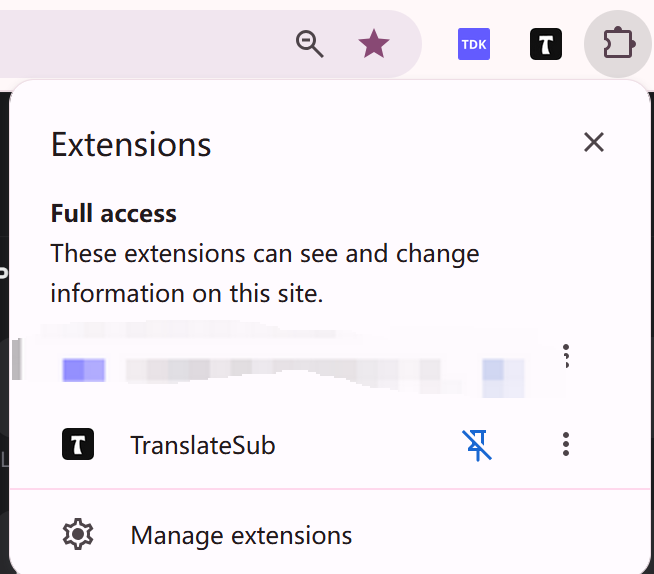
One-Click Installation via the Store: Visit the Chrome Web Store, enter "TranslateSub" into the search box, and click the blue "Add to Browser" button. Once the installation is complete, click the puzzle-piece icon (Extensions) in the top-right corner of your browser, and click the small pin icon to pin it to your toolbar.
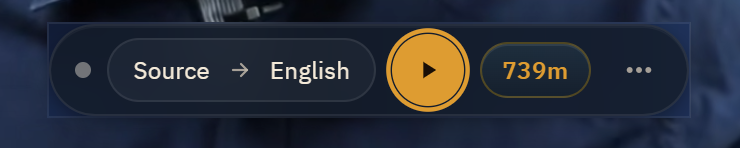
Activate the Control Panel: Open the Coursera or Udemy course—or YouTube video—you wish to study. Click the TranslateSub icon on your browser's toolbar and log in. You will immediately see a sleek, minimalist control panel elegantly unfold just above the video player.
Freely Select Language Pairs: From the control panel's drop-down menu, select the video's original language (e.g., English or Portuguese). Then, set your target language to your native tongue (e.g., Spanish or Chinese). Thanks to its support for a matrix of over 75 languages, this configuration can be seamlessly reused in the future—whether you are posted abroad to learn Russian or any other less common language.
Unlock Limitless Learning: Simply click the prominent green "Start" button and play the video. Precise, side-by-side bilingual subtitles will instantly appear, perfectly synchronized with the instructor's voice, ensuring an incredibly smooth and fluid learning experience.
3. Exclusive Self-Study "Freebie" Guide: Slash the Cost of Professional Upskilling to Zero
As a working professional personally funding my own career upskilling and cross-disciplinary investments, shouldering the monthly subscription fees for various advanced AI tools can indeed be a significant financial burden. This is a major reason why I highly recommend TranslateSub—its pricing structure is transparent and straightforward, and it is remarkably generous toward self-learners.
Upon registration, the system immediately grants you a free plan that includes 200 credits. If you find yourself running low on credits due to an intense daily study schedule, the platform features an excellent built-in credit-boosting mechanism (Referral Program):
Referral Bonus: Simply open the plugin panel, click "Invite Friends," and copy your unique referral link.
Points for Both: Share the link with your colleagues, university classmates, or drop it into a technical discussion group. As soon as someone registers using your link, both you and the new user will instantly receive 100 free points each.
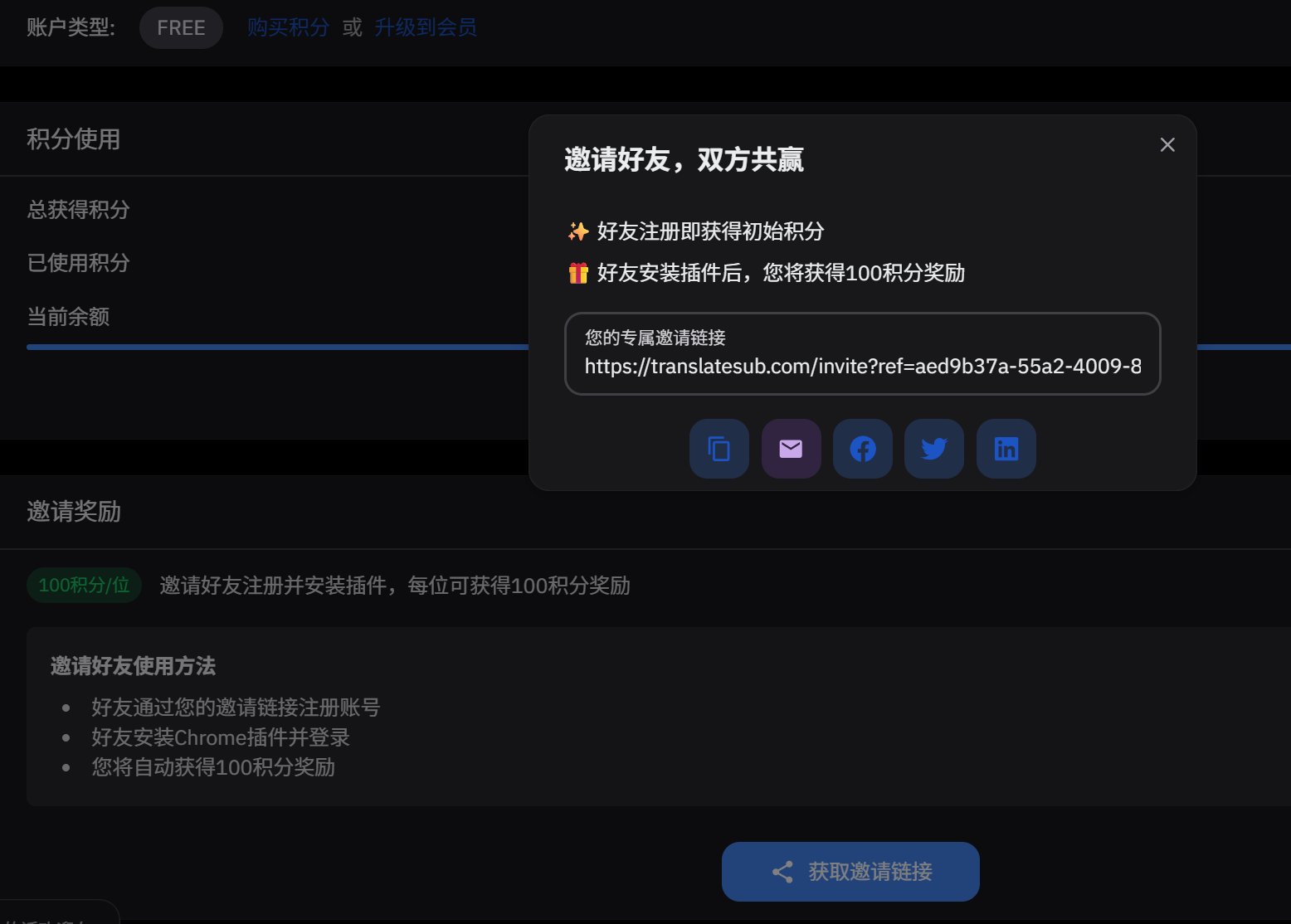
By leveraging this "viral hack" for snagging freebies, I recruited a few like-minded friends who were also learning AI; together, we effortlessly accumulated enough video translation credits to cover an entire semester's worth of online coursework—achieving a truly zero-cost, completely free ride!
Plan Type | Key Benefits | Price | Free Plan (Plan Gratis) | Sign up to instantly receive 200 initial credits and experience high-accuracy, real-time AI subtitles | $0 | Pay-as-You-Go (Pago por Uso) | Flexibly top up your balance whenever it runs low; credits are deducted on demand with no burden of mandatory monthly fees | Starts at $1 | Basic Plan (Plan Básico) | Access a dedicated priority channel and unlock 400 minutes of extended AI subtitle processing time for streaming media each month | $9.9/month
4. The User's Wishlist: The Two Major Pain Points I Hope to See Improved in the Future
While TranslateSub has currently become an indispensable lifesaver for my online coursework—and a crucial tool in my sprint to secure an overseas assignment—as a heavy daily user, I have submitted two highly anticipated improvement suggestions to their product team:
A Dedicated iOS/Android Mobile App: Although the desktop version currently runs flawlessly, for working professionals like us, the subway and bus commutes are the true battlegrounds for "fragmented micro-learning." It would be truly perfect if—taking a cue from how Immersive Translate operates on mobile—you could prioritize the release of dedicated apps for phones and iPads. This would allow us to instantly access real-time bilingual translations with just a single tap while scrolling through YouTube Shorts or tech-focused TikTok videos during our daily commutes.
One-Click Subtitle Downloads & a Learning Community: I am extremely eager to see a future update that allows users—while watching online courses—to directly download the translated subtitles (packaged as .SRT or .VTT files) to their local device with a single click from the playback interface. This would effectively double the speed at which I can import my notes into Notion. Furthermore, it would be fantastic if the official team could establish a "Collaborative Self-Study & Accountability Community." This would make it easier for us to exchange referral links within the group—allowing us to redeem those valuable 100-point rewards—and to connect with fellow self-learners from diverse professional backgrounds. I’ve already noticed that this feature is marked as "coming soon" on your roadmap, and I’m looking forward to it immensely!
Nevertheless, its minor flaws are far outweighed by its merits. Precisely because of the robust underlying language matrix supporting it, I was able—in just three weeks—to power through four rigorous, hands-on AI certification courses; my English listening skills improved dramatically, and I can even now understand basic Russian conversational pleasantries. Once my current overseas assignment concludes and I return home—whether I choose to delve deeper into AI or explore other less common languages—I fully intend to keep renewing my subscription to this tool, giving it a permanent home in my Chrome toolbar.
FAQ
Q: Is its real-time translation feature stable on YouTube Live streams and short-form videos?
A: Extremely stable. This is precisely its killer feature. Traditional translation extensions often fail completely when encountering live streams that lack pre-generated closed captions (CC); alternatively, subtitles may become misaligned or vanish entirely while scrolling through the content. TranslateSub, however, employs a monitoring technology specifically engineered for streaming media; it tracks dynamic audio in real-time, delivering rock-solid, side-by-side bilingual subtitles with millisecond precision.
Q: How does TranslateSub compare to Immersive Translate? Which one should I choose for watching online courses?
A: These two tools have entirely different areas of focus. If your daily work involves reading dense PDF reports spanning dozens of pages or technical literature consisting of pure text, Immersive Translate remains the current industry benchmark. However, if your primary channel for acquiring knowledge is video-based multimedia (such as YouTube, Coursera, Udemy, or TikTok), then the video-centric TranslateSub is clearly the lighter and smoother option. Furthermore, in scenarios involving long-form videos, it avoids the issues—such as computer overheating or browser freezing—that can arise from script bloat in other tools.
Q: How many languages does this extension support in total? Does it support niche languages?
A: It currently offers flawless support for over 75 language pairs, enabling mutual translation across the globe. Beyond high-frequency combinations like English-to-Chinese or Spanish-to-English, it also seamlessly handles highly specific, cross-regional requirements—such as translating video content directly from Portuguese or German into Spanish or Chinese in real-time. It is fully capable of meeting all the essential language requirements for professionals engaged in self-study or international trade.
Related Posts
The Global Digital Classroom: Scaling Online Learning with AI Subtitle Precision
Top 5 Best Professional AI Real-time Translation Tools & Extensions in 2026 (Full Review)
Effortlessly Add Subtitles to TikTok and Xiaohongshu Videos with TranslateSub
How to Free Download YouTube Video Scripts with Closed Captions in 3 Steps
Step by Step Guide to Generate, Translate, and Edit YouTube Subtitles
Are you ready to break down language barriers and put your career—along with your promotions and raises—into overdrive? Head over to the Chrome Store right now to install TranslateSub and embark on your journey of boundless, high-efficiency self-learning across the web. For more hardcore guides on digital nomadism and workplace productivity hacks, don't forget to keep following our official blog.