How to Translate Live Streams in Real Time with TranslateSub
You open a YouTube Live product launch, a Twitch esports stream, or an international webinar. The topic is useful, but the speaker is moving fast and there are no subtitles in your language. Instead of waiting for a replay, transcript, or recap, real-time subtitles can help you follow the main ideas while the stream is still happening.
This guide explains how TranslateSub's browser extension can help with real-time live stream translation. It is written for viewers who need to understand foreign-language live content as they watch, not for teams translating offline SRT files after a recording is finished.
Why foreign-language live streams are hard to follow
Live streams are valuable because they happen in the moment. A product announcement, online course, conference session, or Twitch stream may lose much of its value if you have to wait hours or days for a replay, written summary, or edited subtitle file.
The difficulty is that live content usually gives you less support than recorded video. Speakers may move quickly, audio quality can change, and the stream may include names, product terms, jokes, chat reactions, or technical vocabulary. A normal web translation extension can translate page text, but it usually cannot help with the audio inside a live video player.
This is where real-time bilingual subtitles can help. They give you a live viewing aid so you can keep up with the main points, decide what deserves closer attention, and avoid relying only on second-hand summaries.
How real-time subtitles can help
TranslateSub provides a browser extension for live stream translation. After you install it in your browser, the extension can listen to the current web page's live audio and display real-time bilingual subtitles over the video.
For example, if you are watching a YouTube Live product launch, a Twitch stream, or an international online event, TranslateSub can help you understand the main ideas as the conversation unfolds. It is most useful when your goal is live comprehension: following the speaker, catching key terms, and deciding whether you need to revisit the recording later.
Real-time subtitles are not the same as publish-ready subtitle files. If you need subtitles for a final video, a quote, a course asset, or a formal record, you should still review the output carefully.
How to use the TranslateSub browser extension in 3 steps
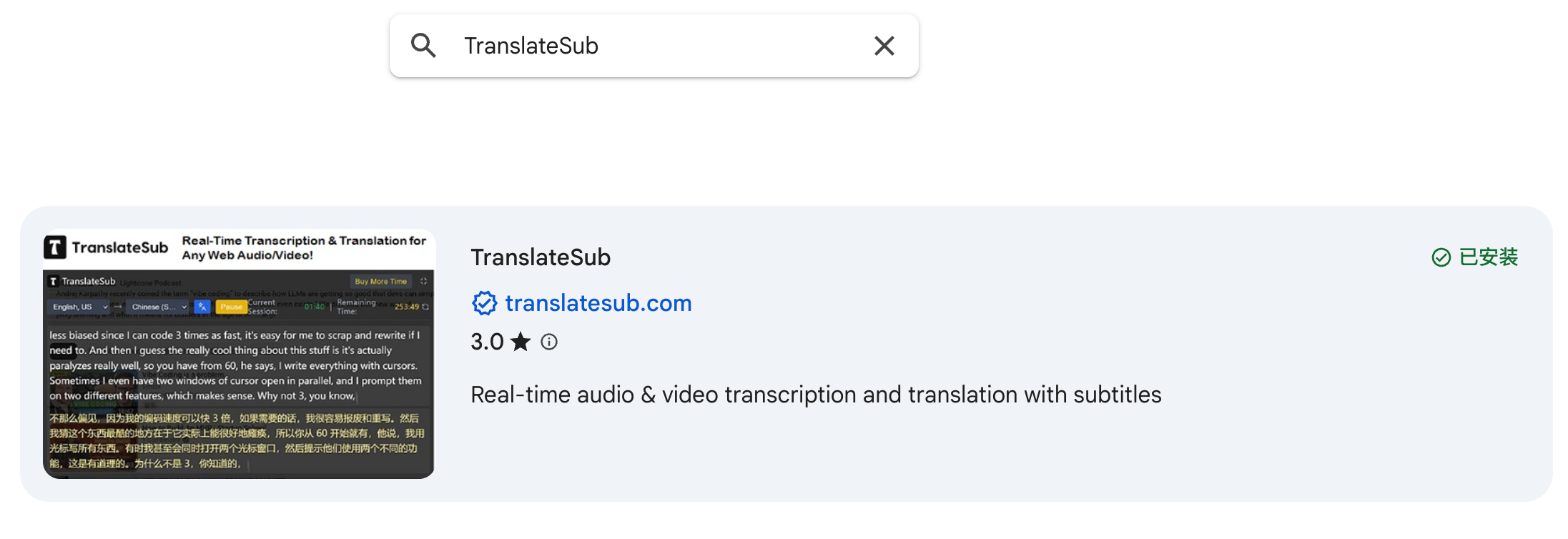
Install the extension. Go to the browser extension store, search for TranslateSub, and add it to Chrome or Edge.
Open the live stream. Visit the YouTube Live, Twitch, webinar, online course, or event page you want to watch.
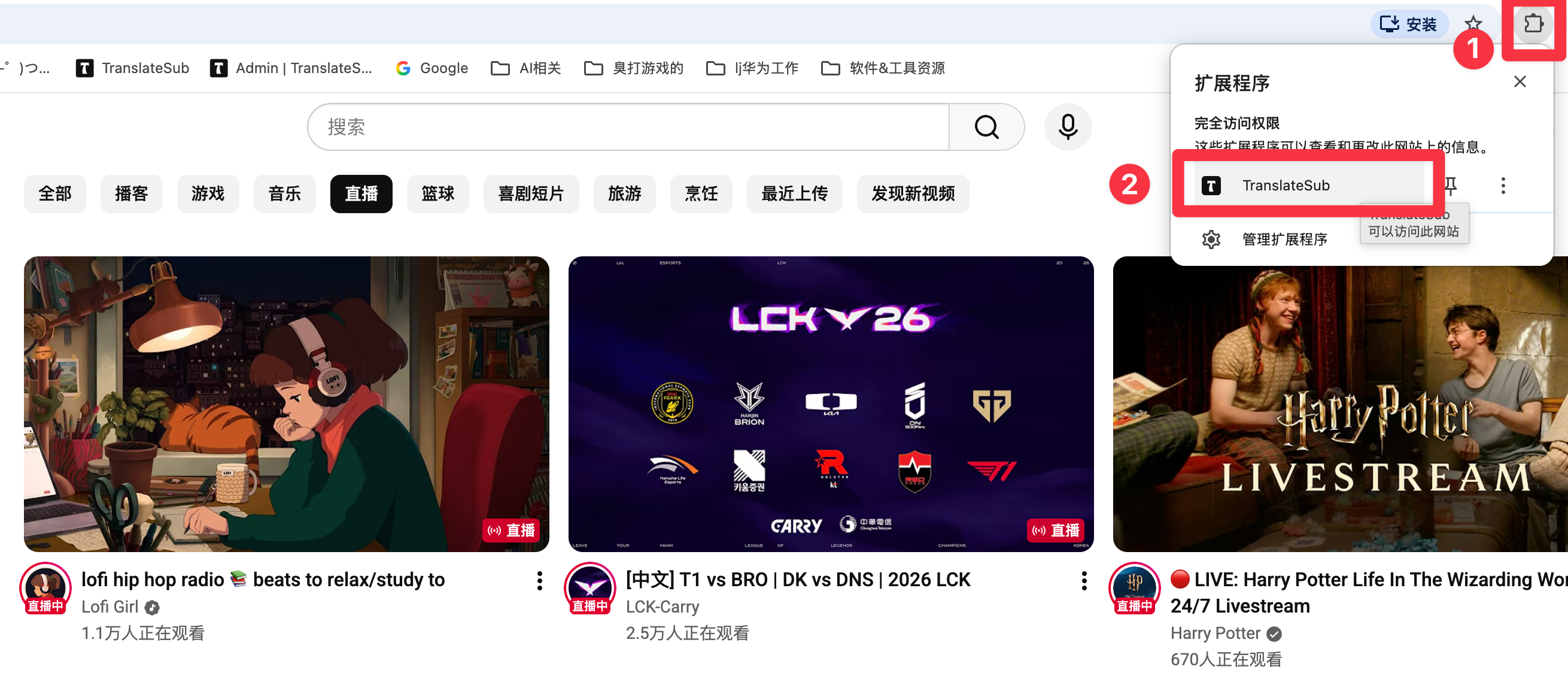
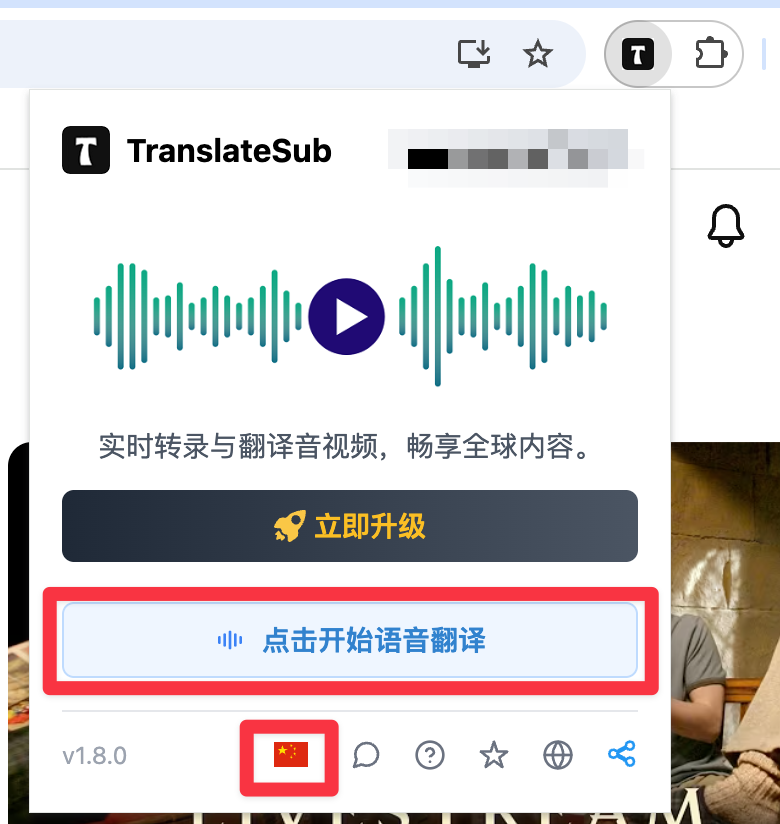
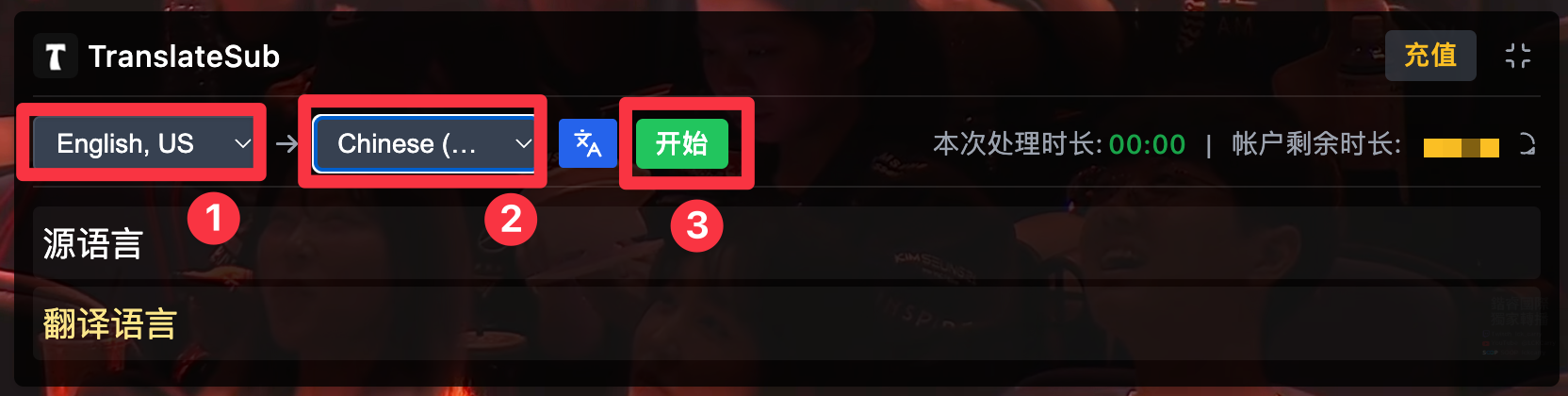
Turn on real-time subtitles. Click the TranslateSub icon, choose your language settings, and start real-time bilingual subtitles for the current stream.
Once subtitles are running, they appear over the live video. You can adjust the subtitle display so it is easier to read without covering too much of the stream.
Suitable and not suitable use cases
TranslateSub is suitable for live viewing situations such as YouTube Live events, Twitch streams, webinars, online classes, product launches, and international conference sessions. It is especially helpful when you need to follow the main points quickly and decide whether to keep watching, take notes, or review the replay later.
It is not suitable as the only source for legal conclusions, medical advice, financial decisions, certified translation, or formal meeting minutes. For professional or high-risk content, use AI real-time subtitles as an understanding aid and review important details with the original source or a qualified person.
Related reading
If you also work with subtitles, online learning content, or video translation tools, these English guides may be useful:
FAQ
What can TranslateSub do when a live stream has no subtitles?
TranslateSub can help generate real-time bilingual subtitles from the audio on the current live stream page, so you can follow the main ideas while watching.
Does TranslateSub work with YouTube Live and Twitch?
It is designed for common web-based live viewing situations, including YouTube Live and Twitch. Actual results can depend on the page player, audio quality, browser environment, and network conditions.
What is the difference between real-time subtitles and subtitle files?
Real-time subtitles are for live viewing and quick understanding. Subtitle files such as SRT or VTT are usually prepared after a recording is available and are better suited for publishing, editing, or formal review.
Are AI real-time subtitles accurate enough?
They can be useful for understanding the main points of a live stream, especially when the audio is clear. They should not be treated as guaranteed word-for-word interpretation.
Do I need to review AI subtitles?
For casual viewing, you may not need to review every line. If you plan to quote, publish, summarize, or make decisions from the content, review names, numbers, terminology, and any important claims.
Can I rely on AI subtitles for legal, medical, or financial live streams?
No. AI real-time subtitles can help with initial understanding, but they should not be the only basis for legal, medical, financial, or other high-risk decisions.
Will real-time translation have delay?
Yes, there can be some delay. The delay depends on the live audio, page player, network conditions, device performance, and browser environment.
Try real-time bilingual subtitles for live streams
If you often watch foreign-language live streams on YouTube Live, Twitch, webinars, or online events, you can try the TranslateSub browser extension to turn on real-time bilingual subtitles and decide whether it helps you follow the stream more comfortably.