Mastering Global Markets: How I Use AI Real-Time Translation to Crush My Trading Strategy
Being an independent investor isn't just about watching charts—it’s about information speed. When I left the corporate world to go full-time with my own portfolio, I realized that the "information gap" was my biggest competitor.
Every morning at 6:00 AM, I’m live on Bloomberg TV, scanning for the latest market shifts. The issue? The most critical macro analysis, Fed interest rate decisions, and CEO interviews are delivered at lightning speed in English, often with zero subtitles. Before I integrated the right tools, I was constantly pausing, looking up jargon, and missing the context of these fast-paced market insights.
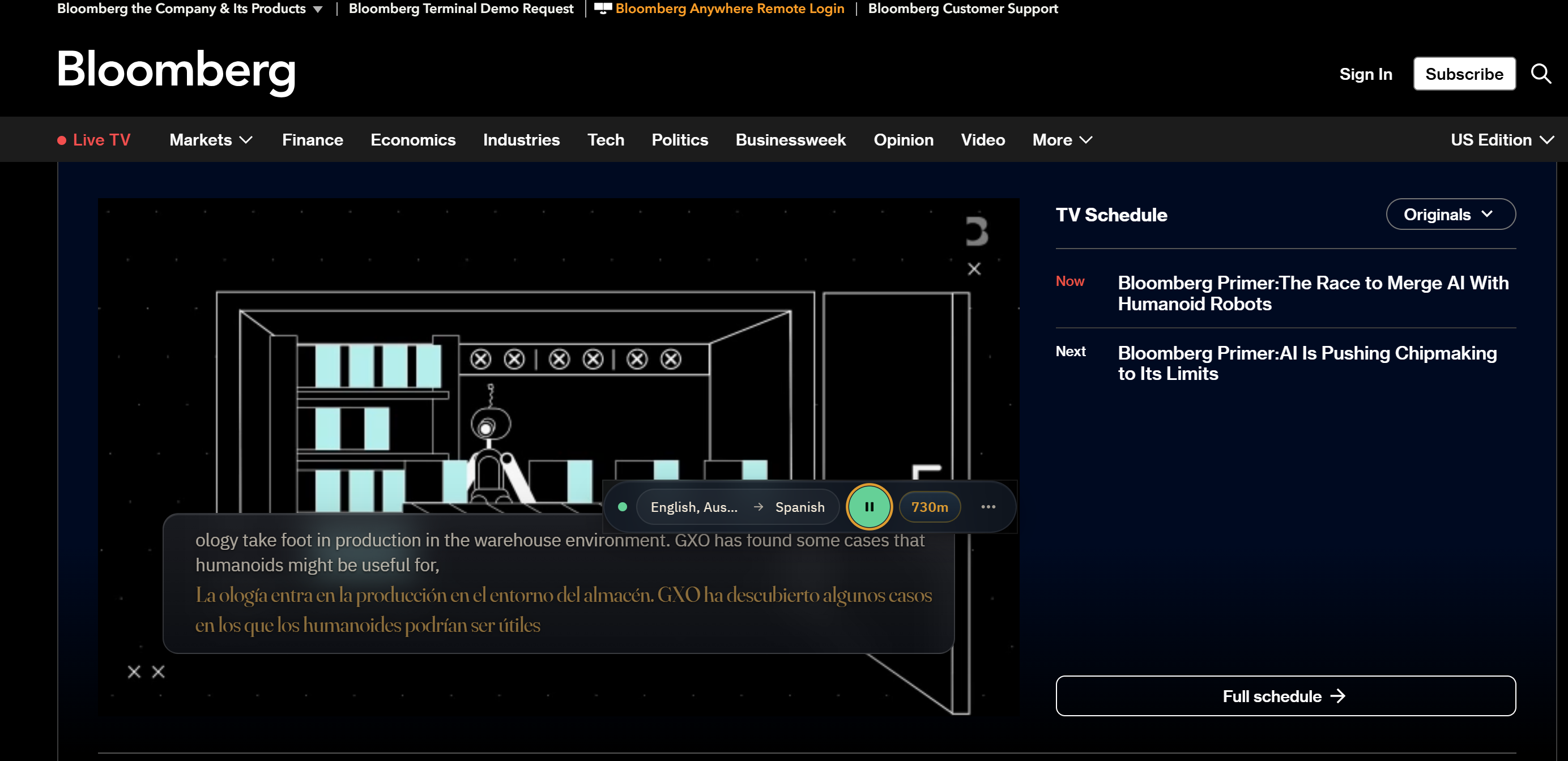
My breakthrough came when I started using the Real-time Finalce TranslateSub Chrome extension. It’s not just a translator; it’s a dedicated live video translation extension that acts as my "co-pilot" for global market research. Because I’m analyzing high-stakes financial data, I need more than just literal word-for-word translation—I need to distinguish between different speakers and understand complex terminology like "Liquidity," "Yield Curve," or "Institutional Inflow" .
1. Why "Real-Time" Synchronization is Non-Negotiable in Finance
In trading, 30 seconds can be the difference between a profit and a loss. Standard browser translators fail here because they are not designed for live video; they rely on pre-existing Closed Captions (CC) that are often nonexistent during fast-paced market broadcasts, or they lag so far behind that the trade opportunity has already evaporated.
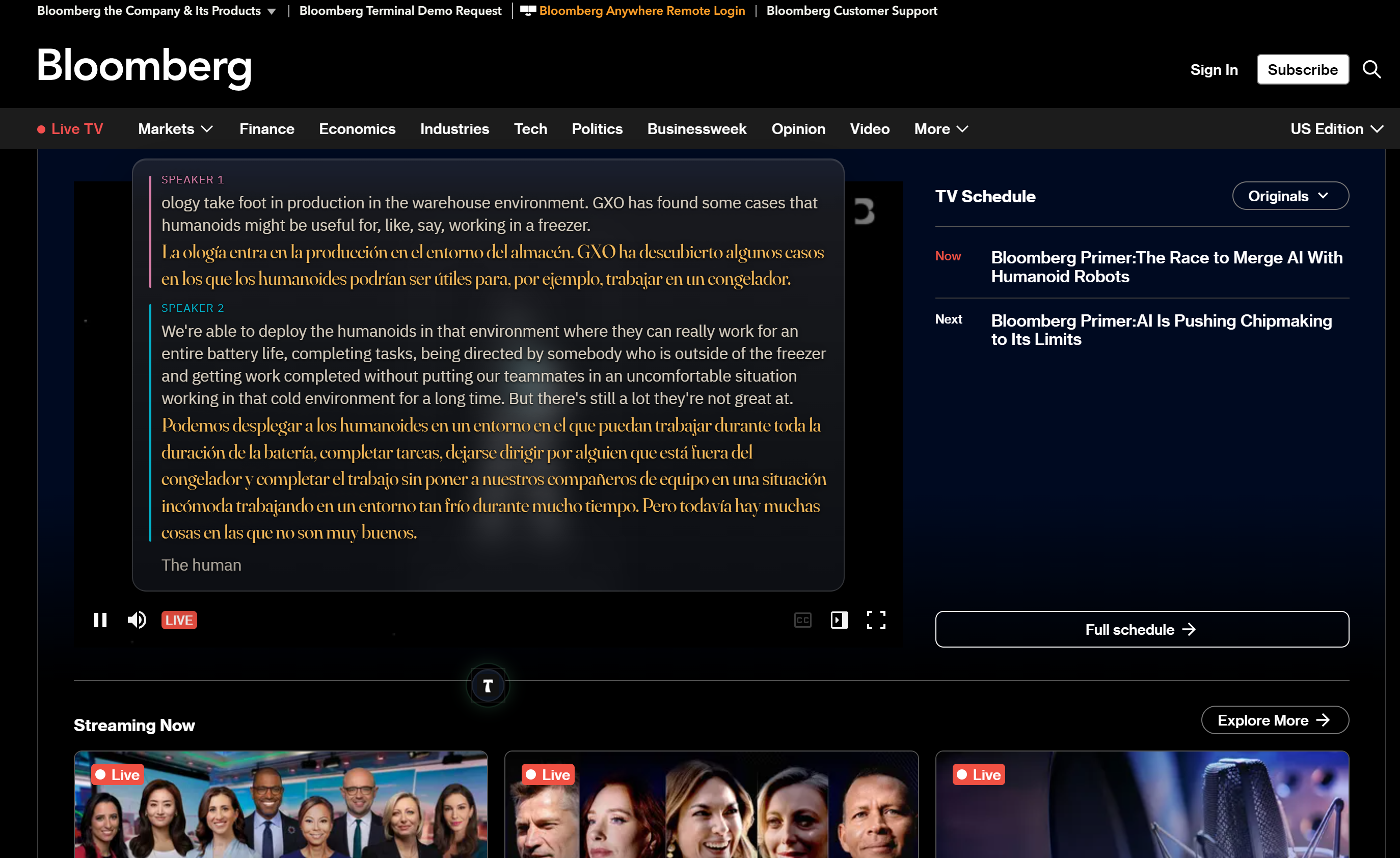
TranslateSub changes the game by using a real-time observer to capture the audio feed directly from the stream. What makes this essential for my morning macro analysis is the intelligent speaker segmentation. Unlike generic tools that dump a wall of text onto your screen, TranslateSub identifies and separates different speakers in real-time. When an analyst is debating a central banker, the subtitles clearly distinguish between the two, keeping the dialogue structured and readable.
Whether a speaker is talking at 1.5x speed or it’s a chaotic market report, the bilingual subtitles pop up instantly, perfectly aligned with the correct speaker. Being able to follow these debates in real-time without the confusion of a "text dump" has allowed me to sharpen my investment strategy significantly. In fact, I recently secured my first "double" on a major market move, and a huge part of that was simply having the right information, fast.
2. Tailored Terminology for Investors
Generic translators "hallucinate" technical jargon. They might translate "Short" (a trading position) as "short in length," which is a disaster in an analysis video. TranslateSub is different—it’s built with academic and professional terminology libraries. It understands the specific context of Financial Engineering, AI tech, and macro-economics .
The result is a clean, readable bilingual layout that lets me focus on the data, not the dictionary. It’s this level of accuracy that allows me to process two hours of intense market front-running reports in just two hours—no pause, no search, just raw strategy development .
3. Study for Free: The Referral Hack
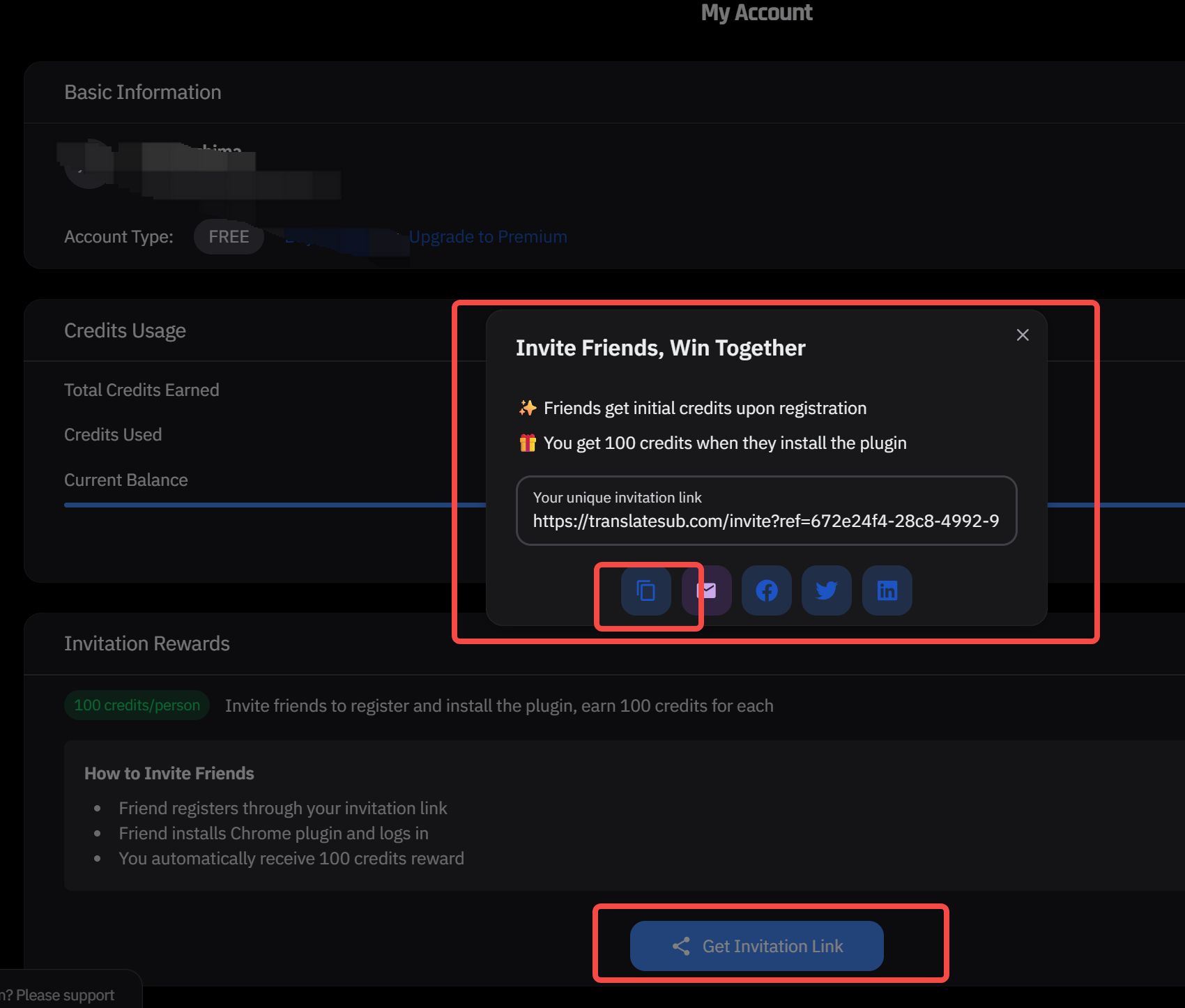
I’m a heavy user, but I don’t even need the $69.90 Pro plan. The "Invite Friends" feature is a brilliant referral loop. Every time a trading colleague or friend signs up using my referral link, both of us get 100 free credits .
4. My Wishlist for the Future
TranslateSub is my essential productivity tool, but as a professional investor, I have a few feature requests to make my life even easier .
Native Mobile Apps (iOS/Android): I’m often traveling or monitoring markets on the move. Having a dedicated app to get real-time AI video translation while I'm on a flight or at the airport would be incredible .
Local Subtitle Downloads: I’d love to save the translated SRT file directly to my computer. This would allow me to archive the bilingual scripts into my investment journals for long-term reference .
Frequently Asked Questions (FAQ)
Q: Is this the best video translator for YouTube live streams? A: Yes. Unlike standard plugins that fail without pre-existing Closed Captions (CC), TranslateSub acts as a native live video translation extension, generating bilingual subtitles in real-time.
Q: How many languages does it support? A: It currently supports 75+ language pairs, covering everything from professional English to Mandarin translation to niche regional needs like English to Bulgarian.
Q: Why choose TranslateSub over Immersive Translate? A: Immersive Translate is excellent for text and PDFs, but TranslateSub is optimized specifically for video and streaming content. If you want zero-lag, real-time AI subtitle generation for YouTube and TikTok, TranslateSub is the faster, more specialized choice.
Related Posts
Best AI Real-time Translation for Coursera and Udemy: How I Crushed My International Courses
The Global Digital Classroom: Scaling Online Learning with AI Subtitle Precision
Top 5 Best Professional AI Real-time Translation Tools & Extensions in 2026 (Full Review)
Effortlessly Add Subtitles to TikTok and Xiaohongshu Videos with TranslateSub
How to Free Download YouTube Video Scripts with Closed Captions in 3 Steps
Step by Step Guide to Generate, Translate, and Edit YouTube Subtitles
Ready to gain an edge in your market research? [Install TranslateSub on Chrome Store] today and turn every live stream into a actionable data source. Built by a student and investor, for those who need information fast.